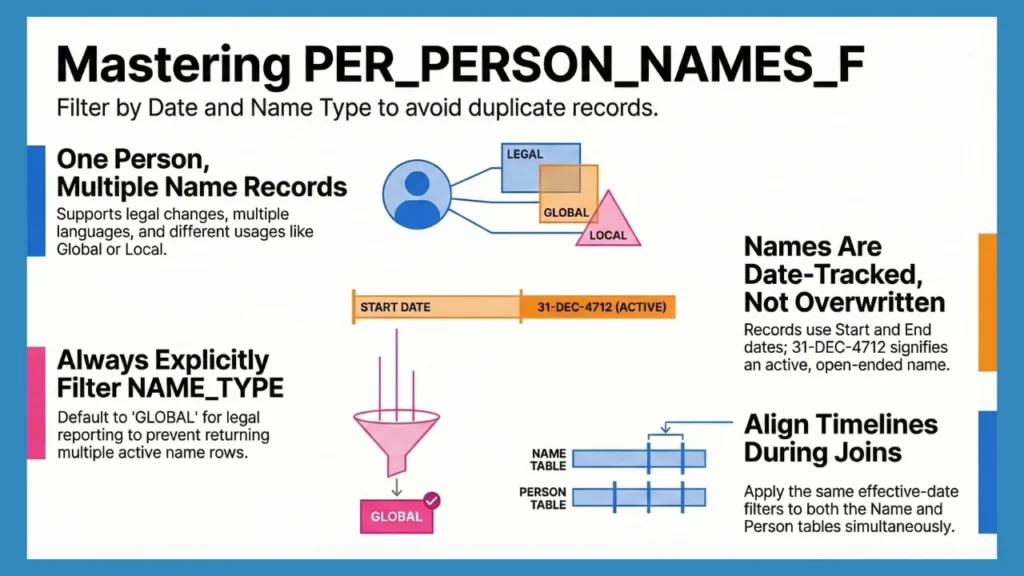
In Oracle Fusion HCM, person name data is more complex than it appears because names are not static attributes. Fusion is designed to support multiple languages, multiple name usages, and legal name changes over time, all of which are common in global HR implementations.
Requirements such as storing names in both English and Arabic, or preserving historical names after legal changes like marriage, cannot be handled reliably in a single table.
To address this, Oracle stores name data separately using the PER_PERSON_NAMES_F table, linked to PER_ALL_PEOPLE_F through PERSON_ID.
This blog focuses on how PER_PERSON_NAMES_F works in practice, its structure, effective-dating behavior, and the correct way to join and query it in Oracle Fusion HCM.
What Is PER_PERSON_NAMES_F in Oracle Fusion?
In Oracle Fusion HCM, person name data is intentionally separated from core person records. This design allows Fusion to support multiple names for the same person, across languages, usages, and time, without relying on customization or extensions. PER_PERSON_NAMES_F is the table that enables this behavior.
Purpose of the PER_PERSON_NAMES_F Table
PER_PERSON_NAMES_F is the authoritative table for storing person names in Oracle Fusion HCM. Its purpose is to allow a single person to have multiple name records, each serving a specific business or legal requirement.

This includes support for:
- Multiple languages
- Different name usages such as legal, local, and preferred
- Legal name changes tracked over time
Each row in PER_PERSON_NAMES_F represents one version of a person’s name, valid for a defined period and differentiated by usage.
How Does This Differ from Oracle E-Business Suite (EBS)?
In Oracle E-Business Suite, person names were stored directly in PER_ALL_PEOPLE_F. This model supported only a single primary name. Any requirement for additional names, such as local language names or alternate spellings, typically requires Descriptive Flexfields or custom logic.
Oracle Fusion removes this constraint by treating names as first-class, effective-dated data, eliminating the need for DFF-based name storage.
Also Read: PER_ALL_PEOPLE_F Explained
Role of Name Types in PER_PERSON_NAMES_F
A key attribute in this table is NAME_TYPE. It defines how a name is intended to be used within Oracle Fusion.
This allows multiple name records for the same person to coexist at the same time, each serving a different purpose. Common values include Global, Local, and Preferred.
Fusion applications rely on NAME_TYPE to decide which name to display or process, rather than assuming a single name per person. Some of its ommon examples include:
- GLOBAL
- LOCAL
- PREFERRED
Global vs Local Names in PER_PERSON_NAMES_F
| Aspect | Global Name | Local Name |
|---|---|---|
| Purpose | Represents the primary legal name of the person | Represents a country-specific or language-specific version of the name |
| Country Dependency | Not tied to any specific country format | Tied to local legislation and cultural requirements |
| Typical Usage | Enterprise-wide reporting, integration, legal and audit purposes | Local compliance, statutory documents, country-specific UI displays |
| Language | Usually stored in a common/global language (often English) | Stored in the native or required local language |
| LEGISLATION_CODE | Populated (derived from Legal Entity or person context) | Populated (derived from local legislation) |
| Coexistence | Exists alongside Local names | Exists alongside Global names |
Understanding LEGISLATION_CODE
In real Oracle Fusion environments, LEGISLATION_CODE is almost always populated.
For employees, it is derived from the Legal Entity or employment legislation. For contacts, it is populated based on address legislation or inherited from the associated person context.
Because of this, LEGISLATION_CODE should not be used to distinguish Global and Local names. NAME_TYPE is the correct indicator for name purpose.
Name Formats and Display Behavior
Oracle Fusion uses predefined name format definitions to control how names are stored and displayed across the application. These formats determine the order and presentation of name components and vary by legislation and usage.
As a result, formatted values such as DISPLAY_NAME should be preferred over manual concatenation when consistency with Fusion UI and documents is required.
How Fusion Uses PER_PERSON_NAMES_F Across HCM Modules?
PER_PERSON_NAMES_F is consumed across multiple Oracle Fusion HCM modules, including Core HR, Payroll, Benefits, Absence, Talent, Global HR, and Projects. Because of this wide dependency, incorrect assumptions or joins against this table can affect multiple downstream processes.

Understanding Effective Dating in PER_PERSON_NAMES_F
In Oracle Fusion HCM, name data is not overwritten when it changes (except for corrections). Instead, it is date-tracked. This design allows Fusion to always determine which name was valid at a specific point in time, which is critical for payroll, statutory reporting, and audits.
Effective dating is the mechanism that makes this possible.
Rather than storing just one name per person, Oracle Fusion stores multiple name records, each valid for a defined period. The system then chooses the correct name based on the as-of date of the transaction or report.
How Does Effective Dating Works in Oracle Fusion?
PER_PERSON_NAMES_F is an effective-dated table. Every row includes:
- A start date, indicating when the name becomes valid
- An end date, indicating when the name stops being valid
When a name changes, Oracle Fusion does not update the existing row. Instead, it:
- Sets the EFFECTIVE_END_DATE of the existing record
- Creates a new row with a new EFFECTIVE_START_DATE
This approach ensures historical data remains intact.
Understanding EFFECTIVE_START_DATE and EFFECTIVE_END_DATE
EFFECTIVE_START_DATE marks the first day a name can be used.
EFFECTIVE_END_DATE marks the last day the name remains valid.
Both dates are inclusive.
This means that for any given date, only one name record should be valid for a person and name type.
The screenshot below shows how Oracle Fusion manages multiple name records for a person across different effective periods.

Why Does 31-DEC-4712 Appear in Fusion Tables?
In Oracle Fusion, the date 31-DEC-4712 represents an open-ended future. When you see this date in EFFECTIVE_END_DATE, it means:
- The name record is currently active or future-dated.
- There is no known end date yet
Once a new name becomes effective, this date is replaced with the day before the new name starts.
Why a Person Can Have Multiple Name Records Over Time?
In Oracle Fusion HCM, a person’s name is not just a label; it is legally and historically significant. Once a name is used in payroll, statutory reporting, or compliance documents, it cannot simply be overwritten without breaking historical accuracy. This is where effective dating becomes essential. Oracle Fusion is designed to answer questions like:
- What was this employee’s legal name when payroll was processed last month?
- Which name should appear on a retro payslip or audit report?
- What name should be used for transactions going forward?
To support this, Fusion allows multiple name records for the same person, each valid for a specific period. Historical payroll results continue to display the name that was valid at the time, reports run “as of” a date reflect the correct historical name, and future transactions automatically use the most recent one. This behavior is not optional, it is fundamental to payroll accuracy and statutory compliance.
Let’s look at a simple but very common real-world scenario.
| An employee named Annie Smith gets married and legally changes her surname to Annie Jones, effective 1st July 2025. Up until 30th June 2025, her legal name is Annie Smith. From 1st July 2025 onward, her legal name will be Annie Jones. Now consider how this impacts the system: When Annie views or reprints her May or June 2025 payroll, the documents must still show Annie SmithPayroll runs, payslips, and statutory outputs generated from July 2025 onward must show Annie Jones Oracle Fusion does not overwrite the old name to achieve this. Instead, it ends the existing name record and creates a new effective-dated record in PER_PERSON_NAMES_F. The system then determines which name to display purely based on the as-of date of the transaction or report. |
This is why querying PER_PERSON_NAMES_F without proper effective-date logic almost always leads to incorrect results.
Retrieving the Correct Name Using Effective Dates
To retrieve the current active name, always filter using:
SYSDATE BETWEEN effective_start_date AND effective_end_dateFor historical or audit reporting, use an as-of date:
| :P_AS_OF_DATE BETWEEN effective_start_date AND effective_end_date |
This logic ensures that the name returned matches the date context of the transaction.
Key Columns in PER_PERSON_NAMES_F
PER_PERSON_NAMES_F is not a wide table, but the columns it contains are heavily overloaded in meaning. Most reporting issues related to names come from misunderstanding what these columns represent and how Oracle Fusion uses them internally.
Below are the key columns you will work with most often and how they behave in real Fusion environments.
| Column Name | What It Represents in Oracle Fusion | Practical Notes / Gotchas |
|---|---|---|
| PERSON_ID | Identifier for the person entity | Used to join with PER_ALL_PEOPLE_F. Shared across Core HR, Payroll, Benefits, Absence, Talent, Projects. Not assignment-specific. |
| PERSON_NAME_ID | Unique identifier for each name record | A single person will have multiple records due to name types and effective dating. Mostly useful for audits and debugging, not reporting joins. |
| NAME_TYPE | Defines how the name is used | Common values: GLOBAL, LOCAL, PREFERRED. Always filter explicitly. By default, at least two records usually exist per person. |
| FIRST_NAME | Structured first name | Population depends on name format and legislation. Do not assume it is always populated for every name type. |
| LAST_NAME | Structured last name | Same considerations as FIRST_NAME. Order and usage may vary by country. |
| KNOWN_AS | Informal or commonly used name | Often used for preferred names or UI greetings. Not always populated. |
| DISPLAY_NAME | Formatted name as shown in UI and documents | Derived using name format definitions. Prefer this over manual concatenation if matching Fusion UI output matters. |
| PREFERRED_NAME | Preferred display version of the name | Also derived. Used in some modules for informal or user-facing contexts. |
| EFFECTIVE_START_DATE | Date from which the name is valid | Inclusive. Always evaluate names using an as-of date or SYSDATE. |
| EFFECTIVE_END_DATE | Date until which the name is valid | Inclusive. 31-DEC-4712 indicates an active/open-ended record. |
| LEGISLATION_CODE | Country/legislation context of the name | In real Fusion environments, this is almost always populated (employees: Legal Entity; contacts: address or contactee). Do not use NULL checks to identify Global names. |
| CREATED_BY | User or process that created the record | Useful for audit and data correction analysis. |
| LAST_UPDATED_BY | User or process that last updated the record | Helpful for tracing integrations, HDL loads, or manual changes. |
Must Read: How to Query Oracle Fusion HCM Tables SQL?
Name Types in Oracle Fusion HCM
If effective dating explains when a name is valid, NAME_TYPE explains which name Oracle Fusion chooses in a given context. Misunderstanding name types is one of the most common reasons for duplicate rows, mismatched UI vs report output, and incorrect names appearing in documents.
In Oracle Fusion, a person almost never has just one name record.

Common NAME_TYPE Values and Their Purpose
Oracle Fusion supports multiple NAME_TYPE values, each serving a specific business purpose. The exact set can vary slightly by implementation, but the following are the most encountered.
| NAME_TYPE | Purpose | Typical Usage |
|---|---|---|
| GLOBAL | Primary legal name | Enterprise reporting, payroll, integrations, audits |
| LOCAL | Country- or language-specific name | Statutory documents, local compliance, regional UI |
| PREFERRED | Informal or chosen name | UI display, greetings, some talent modules |
In most Fusion environments:
- GLOBAL and LOCAL names coexist
- PREFERRED names are optional but common
Global vs Local: What Actually Happens
The Global name represents the person’s legal identity across the enterprise and is typically what developers expect when they think of “employee name.” It is widely used in payroll processing, integrations, and compliance reporting.
The Local name exists to satisfy legislation or language requirements. In countries where native scripts or localized formats are mandatory, Fusion selects the Local name automatically for relevant transactions and documents. Fusion does not choose between Global and Local names based on recency, but based on legislation and module context.
How Does Fusion Chooses Which Name to Display?
Oracle Fusion decides which name to display based on a combination of:
- NAME_TYPE
- Effective date
- Legislation context
- Application or module behavior
- Name format configuration
This is why the same person can appear with different names in different parts of Fusion while still being technically correct.
Reporting Guidance (Practical)
When querying PER_PERSON_NAMES_F, NAME_TYPE should always be an intentional choice. If no specific requirement exists, defaulting to GLOBAL is the safest option. Never assume one name record per person, and never rely on LEGISLATION_CODE alone to distinguish name usage.
Joining PER_PERSON_NAMES_F with PER_ALL_PEOPLE_F
Almost every meaningful query involving PER_PERSON_NAMES_F also involves PER_ALL_PEOPLE_F. The reason is simple: PER_ALL_PEOPLE_F is the master table for the person, while PER_PERSON_NAMES_F is a dependent, effective-dated child table.
If this relationship is misunderstood or implemented casually, the result is usually duplicated rows, incorrect names, or outputs that don’t match what users see in Oracle Fusion.
Why Is PER_ALL_PEOPLE_F the Primary Join Table?
PER_ALL_PEOPLE_F represents the person entity itself. It stores attributes such as person number, person type, and lifecycle dates. Every name record in PER_PERSON_NAMES_F belongs to exactly one person in PER_ALL_PEOPLE_F, linked through PERSON_ID. This means:
- You should always start from PER_ALL_PEOPLE_F
- Names should be joined in, not queried independently
- Person-level filters belong on PER_ALL_PEOPLE_F, not on the name table
Thinking of PER_PERSON_NAMES_F as an extension of PER_ALL_PEOPLE_F helps avoid many design mistakes.
The Basic Join Relationship
The physical join itself is straightforward: both tables share the same PERSON_ID. The complexity does not come from the join condition, but from effective dating and filtering.
A join that only matches PERSON_ID is almost never sufficient on its own
Aligning Effective Dates Across Both Tables
Both PER_ALL_PEOPLE_F and PER_PERSON_NAMES_F are effective-dated. This is where many queries go wrong.
If you filter effective dates on only one of the two tables, you are effectively mixing data from different points in time. The person record may be valid for the date you care about, while the name record is not, or vice versa.
For consistent results, both tables must be evaluated using the same date context. Whether you are querying the current state or running an “as-of” report, the effective-date logic should be applied consistently to both tables.
This alignment is what ensures that the person and the name belong to the same historical snapshot.
Example Join Logic (conceptual)
When joining PER_PERSON_NAMES_F with PER_ALL_PEOPLE_F, the logic should always follow the same sequence, regardless of the report or module.
First, both tables must be evaluated for the same effective date, typically the current date. This ensures that the person record and the name record belong to the same point in time
SYSDATE BETWEEN papf.effective_start_date AND papf.effective_end_date
AND SYSDATE BETWEEN ppnf.effective_start_date AND ppnf.effective_end_date
Next, the tables are joined using the person identifier, which is the common key across Oracle Fusion HCM.
papf.person_id = ppnf.person_idFinally, the correct name record is selected by explicitly filtering on the required name type. Without this step, multiple valid name records may be returned for the same person.
| ppnf.name_type = ‘GLOBAL’ |
Retrieving Current vs Historical Person Names
Queries involving PER_PERSON_NAMES_F are always evaluated in a date context, whether that is stated explicitly or not. The difference between a correct result and an incorrect one usually comes down to which date is applied, and where it is applied.
In practice, there are three common patterns: retrieving the current name, retrieving a name as of a specific date, and retrieving full name history.
Current Active Name
For reports that are expected to reflect the current state of Oracle Fusion, both PER_ALL_PEOPLE_F and PER_PERSON_NAMES_F must be filtered using SYSDATE.
The intent here is straightforward: return only records that are currently effective in both tables, and then select the appropriate name record.
SYSDATE BETWEEN papf.effective_start_date AND papf.effective_end_date
AND SYSDATE BETWEEN ppnf.effective_start_date AND ppnf.effective_end_date
AND ppnf.name_type = 'GLOBAL'
Name as of a Specific Date
For payroll, audit, or compliance reporting, the date of interest is often not today. In these cases, the effective-date logic is evaluated against a supplied as-of date, rather than SYSDATE.
The same date must be applied consistently to both tables to avoid mixing data from different time periods.
| :P_AS_OF_DATE BETWEEN papf.effective_start_date AND papf.effective_end_date AND :P_AS_OF_DATE BETWEEN ppnf.effective_start_date AND ppnf.effective_end_date AND ppnf.name_type = ‘GLOBAL’ |
Retrieving Name History
Some requirements are not point-in-time queries but change tracking. In these cases, the objective is to see how a person’s name evolved over time.
Here, PER_ALL_PEOPLE_F is still evaluated for existence, but PER_PERSON_NAMES_F is left unrestricted so that all name records are returned.
SELECT
       papf.person_number,
       ppnf.effective_start_date,
       ppnf.effective_end_date,
       ppnf.first_name,
       ppnf.last_name
FROM   per_all_people_f papf,
              per_person_names_f ppnf
 WHERE
        papf.person_id = ppnf.person_id
        papf.person_number = :P_PERSON_NUMBER
        AND    :P_AS_OF_DATE BETWEEN papf.effective_start_date AND        papf.effective_end_date
ORDER  BY ppnf.effective_start_date;
Common Queries Using PER_PERSON_NAMES_F
Most work with PER_PERSON_NAMES_F falls into a small number of recurring patterns. The SQL itself is rarely complex; the risk lies in missing filters or making assumptions about name uniqueness. The following examples reflect how these queries are typically written in Oracle Fusion environments.
Current Display Name for Active Employees
This is one of the most common requirements: retrieve the current legal name for all active employees. The intent here is to:
- Work only with current records
- Align effective dates across both tables
- Use the Global name as the legal default
SELECT
     papf.person_number,
     ppnf.display_name
FROM
     per_all_people_f papf,
     per_person_names_f ppnf
WHERE
     papf.person_id = ppnf.person_id
     AND SYSDATE BETWEEN papf.effective_start_date AND papf.effective_end_date
     AND SYSDATE BETWEEN ppnf.effective_start_date AND ppnf.effective_end_date
     AND ppnf.name_type = 'GLOBAL'
;
Historical Names for a Specific Person
When investigating audits or HR changes, it is often necessary to see how a person’s name changed over time. In this case:
- The person record is validated using an as-of date
- All name records are returned
- Effective dates are preserved for interpretation
SELECT
     papf.person_number,
     ppnf.name_type,
     ppnf.first_name,
     ppnf.last_name,
     ppnf.effective_start_date,
     ppnf.effective_end_date
FROM
     per_all_people_f papf,
     per_person_names_f ppnf
WHERE
     papf.person_id = ppnf.person_id
     AND papf.person_number = :P_PERSON_NUMBER
     AND :P_AS_OF_DATE BETWEEN papf.effective_start_date AND papf.effective_end_date
ORDER BY
     ppnf.effective_start_date
;
Common Mistakes When Querying PER_PERSON_NAMES_F
Most issues with PER_PERSON_NAMES_F don’t come from bad data or Fusion bugs. They come from assumptions carried over from other systems or from treating name data as static. The points below reflect the problems that surface most often in real Oracle Fusion environments.
- Missing Effective-Date Filters: Filtering only PER_ALL_PEOPLE_F or only PER_PERSON_NAMES_F mixes data from different timelines. The SQL runs, but the result is not a valid snapshot.
- Not Filtering by NAME_TYPE: Fusion does not return one active name per person. At least two records usually exist. If NAME_TYPE is not restricted, duplicates are expected.
- Assuming One Name Per Person: This assumption comes from non-Fusion systems. In Fusion, multiple names are normal and designed behaviour.
- Using LEGISLATION_CODE to Identify Global Names: In live Fusion instances, LEGISLATION_CODE is populated for employees (Legal Entity) and contacts (address or contactee). It does not distinguish Global from Local names. NAME_TYPE does.
- Misaligned Effective-Date Logic: Applying different dates or logic across the two tables produces technically valid but functionally incorrect results. This often shows up as historical reports displaying future names.
- Over-Fetching Data: Queries without effective-date or name-type filters scan far more rows than necessary. This becomes visible quickly in large Fusion environments.
- Casual Querying Without Defaults: If you are exploring data without a specific requirement, always default to NAME_TYPE = ‘GLOBAL’. Multiple name records will exist otherwise.
Performance & Reporting Best Practices
PER_PERSON_NAMES_F is heavily referenced across Oracle Fusion HCM and can grow quickly in long-running environments. Queries against this table need to be written with care, especially in reporting and integrations.
- Always Limit by Effective Dates: Both PER_ALL_PEOPLE_F and PER_PERSON_NAMES_F should be filtered using the same date context. This is critical for correctness and significantly reduces the number of rows evaluated.
- Always Limit by NAME_TYPE: Do not rely on implicit uniqueness. Filtering by NAME_TYPE is not optional in Fusion. For general reporting, GLOBAL is the safest default.
- Be Explicit About Business Context: Understand whether the report is meant for HR operations, payroll, compliance, or analytics. Name selection varies by context, and using the wrong name type can cause mismatches with Fusion outputs.
- Avoid SELECT *: Only select the columns you actually need. Name tables are joined frequently, and returning unnecessary columns increases memory usage and execution time.
- Write Index-Aware Predicates: Effective-date columns and PERSON_ID are heavily indexed. Filtering early on these columns allows Oracle to prune rows efficiently.
- Test Against Name-Change Scenarios: Always validate queries using employees with legal name changes, multiple name types, or long history. Queries that work for “simple” cases often fail in real production data.
- Be Careful with Exploratory Queries: Ad-hoc queries without filters can scan large portions of name history. Even during exploration, include effective-date and name-type filters to avoid misleading results.
How CloudSQL Simplify Working with PER_PERSON_NAMES_F?
Working with PER_PERSON_NAMES_F usually involves iteration. You write a query, inspect the results, adjust filters, and repeat, especially when effective dates and name types are involved. CloudSQL supports this workflow by making exploration and validation faster, not by abstracting Oracle Fusion behavior.
- Auto Suggestions: When writing queries, CloudSQL provides auto suggestions for tables and columns. This reduces context switching to documentation and helps avoid simple mistakes such as incorrect column names or missing fields when working with large Fusion tables.
- Database Browser: The database browser makes it easier to locate PER_PERSON_NAMES_F, related tables like PER_ALL_PEOPLE_F, and understand their structure quickly. This is particularly useful when navigating across Core HR, Payroll, Benefits, Absence, or Projects data without memorizing every table name.
- Dynamic Result Grid: Most issues with name data are discovered after the query runs. CloudSQL’s dynamic result grid allows you to:
- Filter results inline
- Sort by effective dates or name types
- Group records to spot duplicates
- Search within results
- Jump directly to specific columns
- Inspect a single record in isolation
This makes it easier to validate whether:
- Multiple name records exist for the same person
- Effective dates overlap or look incorrect
- The expected NAME_TYPE is being returned
Summary & Key Takeaways
PER_PERSON_NAMES_F is the authoritative table for person names in Oracle Fusion HCM. It exists because names change, differ by language, and serve different purposes across the application.
Effective dating is fundamental to how this table works. Any query that ignores effective start and end dates is operating outside Fusion’s data model and will eventually return incorrect results.
NAME_TYPE is equally important. Multiple name records for the same person are normal, and Fusion always selects a name deliberately based on context rather than assuming uniqueness.
Most issues with person names are not data problems. They come from joins that mix timelines, missing name-type filters, or assumptions carried over from non-Fusion systems.
Once these patterns are understood, querying PER_PERSON_NAMES_F becomes predictable. The table behaves consistently; it just requires queries to respect how Oracle Fusion is designed.
Suggested Read: Oracle Fusion Joins Explained
Frequently Asked Questions (FAQs)
What is PER_PERSON_NAMES_F in Oracle Fusion?
PER_PERSON_NAMES_F is the effective-dated table that stores person name data in Oracle Fusion HCM. It supports multiple name types, multiple languages, and name changes over time. This table is the authoritative source for person names and is linked to PER_ALL_PEOPLE_F using PERSON_ID.
How do I get the current employees name in Fusion?
To get the current employee name, both PER_ALL_PEOPLE_F and PER_PERSON_NAMES_F must be filtered using SYSDATE between their effective start and end dates. You should also explicitly filter by NAME_TYPE, typically GLOBAL, to avoid duplicates and ensure consistent results.
How do I retrieve name history in Oracle Fusion HCM?
To retrieve name history, validate the person using PER_ALL_PEOPLE_F, then return all related records from PER_PERSON_NAMES_F without restricting its effective dates. Ordering by EFFECTIVE_START_DATE lets you see how a person’s name changed over time.