When working with Oracle Fusion data, choosing the right SQL tool can significantly impact productivity and efficiency. Both CloudSQL Desktop and SQL Connect are designed to support Oracle-focused workflows, each with its own strengths and approach.
This comparison provides a clear, unbiased look at how these tools differ across key areas such as features, usability, and pricing. The goal is to help you determine which solution best fits your specific requirements.
CloudSQL vs SQLConnect: Quick Comparison Overview
The table below provides a high-level overview of the key differences between CloudSQL Desktop and SQL Connect, helping you quickly understand how they compare across core areas.

Product Overview CloudSQL vs SQLConnect
Both CloudSQL Desktop and SQL Connect are purpose-built SQL tools tailored for Oracle Fusion environments, but they take slightly different approaches to solving developer and data workflow challenges.
While one emphasizes flexibility, workflow integration, and productivity enhancements, the other focuses on delivering a structured, Oracle-centric IDE experience with built-in intelligence.
Understanding their core positioning and feature philosophy is essential before diving deeper into how each tool supports day-to-day SQL operations.
CloudSQL Desktop
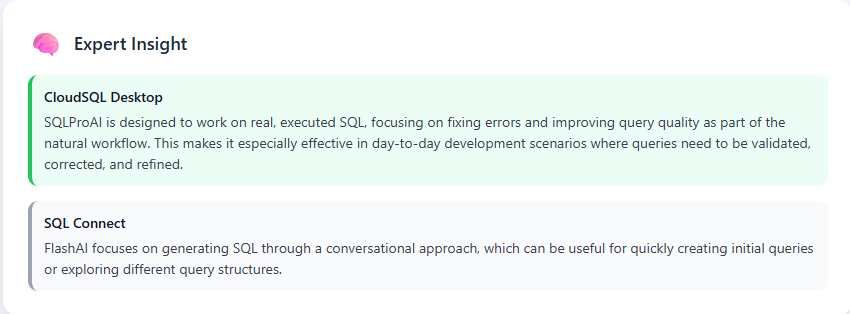
CloudSQL Desktop is a desktop-based SQL tool designed to streamline data access and query execution for CloudSQL Oracle Fusion environments. CloudSQL desktop focuses on improving developer productivity through various features.
These features include AI-driven SQL error fixing, background execution, and integrated workflow capabilities. It is built to reduce friction in everyday tasks like writing, debugging, and managing SQL queries.
In addition to core SQL functionalities, CloudSQL Desktop offers deeper workflow integration, including the ability to work directly with Oracle BI data models.
With a focus on performance, usability, and flexibility, it is positioned as a solution that supports a wide range of users, from individual developers to larger teams working with complex data requirements.
SQL Connect
SQL Connect is a desktop SQL IDE developed specifically for Oracle Fusion SQL tool, including ERP, HCM, and SCM. It is designed to provide a structured environment for querying Oracle data.
SQL Connect supports multiple Fusion pods and features that enhance query writing, such as IntelliSense and syntax highlighting. The tool also incorporates AI capabilities through FlashAI, which assists users in generating SQL queries from natural language inputs.
With a strong focus on Oracle-centric workflows, SQL Connect is positioned as a specialized solution for teams working primarily within the CloudSQL Oracle Fusion ecosystem, offering a consistent and familiar experience for enterprise users.
Also Read: What Is the ROI of CloudSQL Desktop for Oracle Fusion Development Teams?
Feature-by-Feature Comparison of CloudSQL vs SQLConnect
To make a meaningful comparison, it’s important to evaluate how each tool performs across the features that directly impact daily SQL workflows.
Rather than just listing capabilities, this section examines how CloudSQL Desktop and SQL Connect handle execution, AI assistance, data export, setup, and integration in practical scenarios.
The goal is to highlight not only feature availability, but also the overall experience, efficiency, and workflow continuity each tool delivers.
SQL Execution Experience
Both CloudSQL Desktop and SQL Connect provide single-click SQL execution along with background processing, allowing users to continue working while queries are running.
In terms of core execution capability, both tools offer a reliable and efficient experience for working with Oracle Fusion data.
CloudSQL Desktop builds on this foundation by integrating execution closely with the overall workflow, enabling users to move seamlessly between writing, testing, and refining SQL queries.
CloudSQL contributes to a smoother and more continuous development experience, particularly for users who frequently iterate on queries.
SQL Connect also delivers consistent SQL execution within a structured Oracle Fusion environment, supported by development-focused features such as IntelliSense and syntax assistance.

The Last Words: Both tools are comparable in execution capability. The difference lies more in how execution fits into the broader workflow, with CloudSQL Desktop emphasizing a more streamlined and integrated user experience.
AI Assistance Comparison


Data Export & Scheduling
Both CloudSQL Desktop and SQL Connect support exporting query results to common formats such as Excel and CSV, covering standard data extraction needs for CloudSQL Oracle Fusion users.
SQL Connect also includes support for additional formats such as HDL, along with direct export to Oracle Database.
CloudSQL Desktop focuses on providing a streamlined export experience for commonly used formats, ensuring that users can quickly extract and work with data without additional configuration.
In addition to export capabilities, it includes a built-in scheduler that allows users to automate query execution and data export as part of regular workflows.

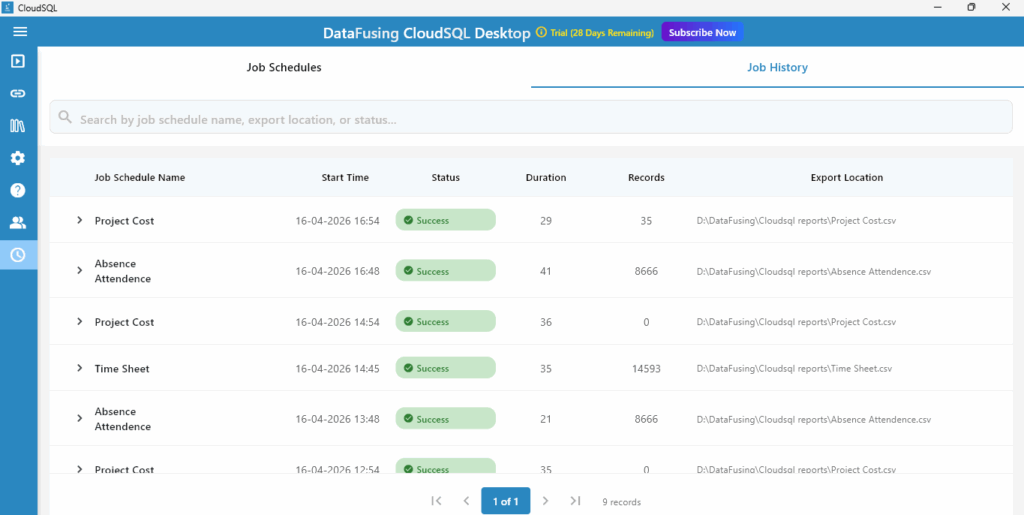
SQL Connect provides broader export format support, including HDL and Oracle Database export, which can be relevant for specific Oracle-driven data operations.
However, scheduling and automation capabilities are not part of its core offering.
Overall, while both tools support standard data export effectively, CloudSQL Desktop extends capability by integrating scheduling and automation, enabling users to move from manual execution to repeatable, workflow-driven data operations.
Suggested Read: AP_INVOICES_ALL Table: Complete Guide for Fusion Finance SQL
Setup & Installation Experience
CloudSQL Desktop uses a lightweight approach, allowing users to get started by simply unzipping and launching the application. It reduces setup time and avoids installation overhead.
SQL Connect follows a standard installation process and requires configuration within the Oracle Fusion environment.
Both tools require appropriate BI roles and permissions. The primary difference lies in how quickly users can get started, with CloudSQL Desktop offering a more streamlined onboarding experience.

Oracle BI Integration & Workflow
CloudSQL Desktop allows users to directly open, edit, and save Oracle BI data models within the tool. This enables a more continuous workflow without switching between applications.

SQL Connect does not provide direct BI data model integration and relies on standard Oracle workflows for managing BI artifacts.
For users working extensively with BI Publisher, direct integration simplifies the process of updating and managing data models, making day-to-day operations more efficient.
Use Case Comparison of CloudSQL Desktop and SQL Connect
The right choice between CloudSQL Desktop and SQL Connect ultimately depends on how and where you use SQL within your workflows.
While both tools serve Oracle Fusion users, their strengths align with different use cases, team structures, and operational priorities.
The following scenarios outline when each tool is likely to be a better fit, based on practical requirements such as ecosystem dependency, automation needs, and day-to-day development workflows.
Choose SQL Connect If
- Workflows extend beyond Oracle Fusion & require connectivity to oracle database or salesforce
- You rely on HDL export formats for specific Oracle data operations
- You prefer a tool that supports SQL generation through AI for initial query creation
- Your team follows established Oracle-centric processes with a structured setup
Choose CloudSQL Desktop If
- You frequently work within Oracle Fusion and want a streamlined, focused experience
- You need to debug, fix, and refine SQL queries as part of daily workflows
- You are looking to automate recurring queries and data exports using a built-in scheduler
- You work extensively with BI Publisher data models
- You prefer a faster setup with minimal installation overhead and quicker onboarding
- You are looking for a cost-effective solution without compromising on core capabilities
You May Read: HZ_CUST_ACCOUNTS Explained: Customer Accounts in Oracle Fusion
CloudSQL Desktop vs SQL Connect Pricing Comparison
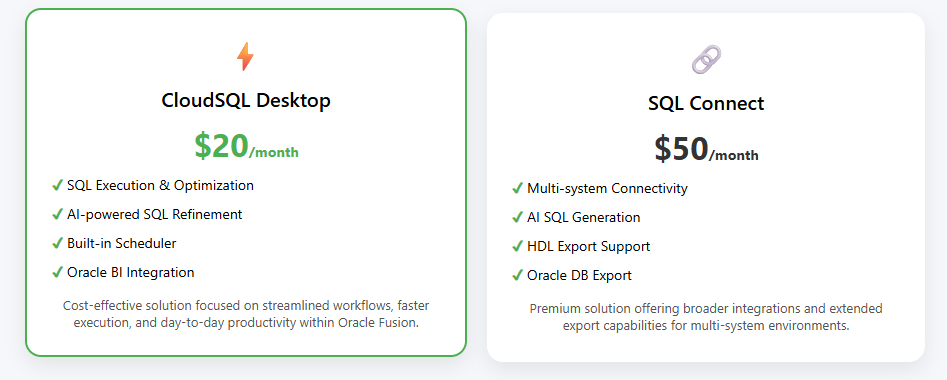
CloudSQL Desktop is priced at approximately $20 per month, offering a cost-effective option for users looking to manage Oracle Fusion data workflows without significant licensing overhead.
It includes core capabilities such as SQL execution, AI-assisted query refinement, scheduling, and BI data model integration within this pricing.
Annual pricing options are also available for organizations looking for longer-term adoption and cost optimization. For larger teams or enterprise requirements, custom pricing can be provided upon request.
SQL Connect is priced at approximately $50 per month and is positioned as a premium offering with broader connectivity options and additional export formats such as HDL and Oracle Database.
The difference in pricing reflects a difference in positioning. CloudSQL Desktop focuses on delivering essential capabilities with a streamlined, efficient workflow, while SQL Connect provides a broader range of integrations and formats for teams with more diverse system requirements.
Conclusion
Both CloudSQL Desktop and SQL Connect are capable tools designed for working with Oracle Fusion data, each taking a different approach to user interaction with SQL workflows.
CloudSQL Desktop focuses on delivering a streamlined, efficient experience with a strong emphasis on execution, query refinement, automation, and direct BI integration, all within a lightweight setup and cost-effective pricing model.
SQL Connect, on the other hand, offers broader connectivity and additional export formats, making it suitable for environments that extend beyond Oracle Fusion.
The right choice depends on how you work. If your priority is a focused, efficient workflow within Oracle Fusion with faster setup and integrated capabilities, CloudSQL Desktop aligns well with those needs.
If your requirements involve working across multiple systems and extended export options, SQL Connect provides the flexibility you need.
Ultimately, both tools serve distinct use cases, and selecting the right one depends on the specific demands of your workflow and environment.
Must Read: HZ_PARTIES Table in Oracle Fusion: Customers, Suppliers & Employees
Get Started with CloudSQL Desktop
If you’re looking to streamline your Oracle Fusion workflows, improve SQL accuracy, and reduce manual effort, CloudSQL Desktop offers a practical and efficient approach.
You can get started with a free 30-day trial to explore its capabilities in your own environment. For a more guided walkthrough, you can also request a demo to see how it fits into your existing workflow.
Start building and refining your queries faster with a tool designed to support real-world SQL execution.