In November 2022, OpenAI released the first ChatGPT model, an event that promised to transform knowledge work across industries, including software development. But can AI truly be trusted to write code?
Oracle Fusion developers, like developers everywhere, have been experimenting with AI to generate SQL. And while AI confidently produces SQL queries, the results are often… mixed.
Ask ChatGPT to write an Oracle Fusion SQL statement, and you will certainly get something back, but not always something you can use. The common problems are familiar:
- The AI hallucinates table names instead of using actual Oracle Fusion schema objects.
- It misunderstands relationships between Oracle Fusion tables, leading to incorrect joins.
- Queries often come back with syntax errors.
- Requirements can be as complex as the SQL itself, so prompts become so long and detailed that developers end up thinking it’s faster to write the SQL manually.
So the question becomes: what can we practically do with AI today?
At DataFusing, we have been exploring this challenge deeply. We have come up with 5 tips for Oracle Fusion Developers to work with AI. And we realised that the most reliable, high-impact use of AI in SQL development right now is not generating full queries, it is identifying and fixing syntax errors.
This blog explains exactly how to do that using CloudSQL’s FixWithAI feature.
What is Fix With AI?
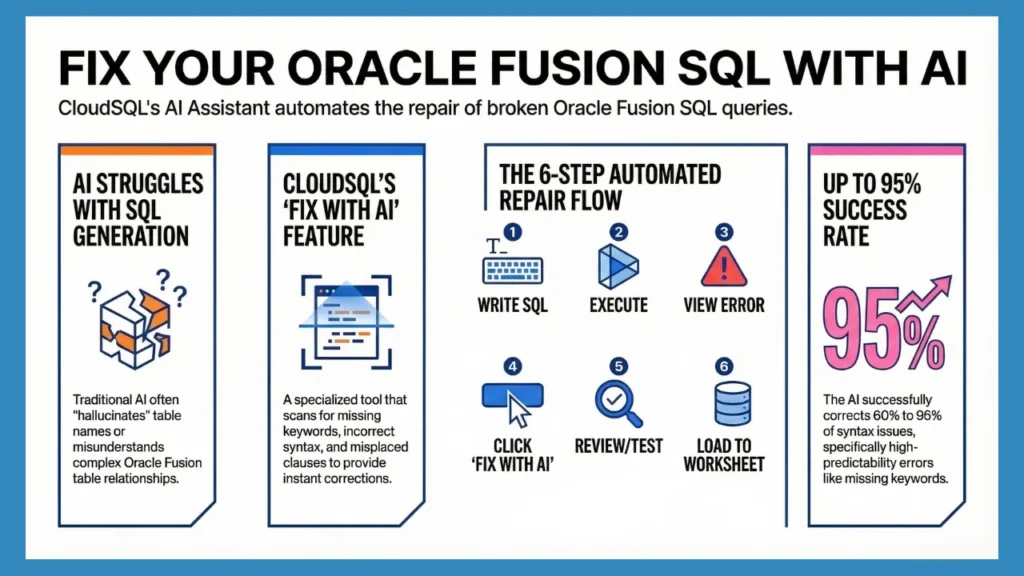
Fix With AI is a feature in CloudSQL that automatically spots and fixes errors in your SQL queries. When you get a syntax error, you can ask AI to take a look. AI scans for issues such as missing commas, incorrect table names, syntax errors, and more.
Instead of having to hunt down what went wrong, you receive a corrected version right away. This makes crafting queries quicker, simpler, and much less stressful for newcomers as well as experienced developers.
Suggested Read: Bind Variables Support for Oracle Fusion SQLs in CloudSQL
How CloudSQL Does It?
CloudSQL uses built-in AI made for Oracle Fusion SQL. As you type, it checks your query, follows Fusion rules, and fixes errors instantly so you can keep working without any interruptions.
Step 1: Write your SQL query in the CloudSQL worksheet (as usual).

Step 2: Click on Execute button to execute.

Step 3: Check the error shown in the result panel, which provides the syntax error.

Step 4: Click on the “Fix With AI” option to let AI data model to analyze the SQL and suggest fixes.

Step 5: Review the optimized SQL and explanation, then use “Test SQL” to validate the SQL syntax against Oracle Fusion.

Step 6: Click on “Load To Worksheet” button to load the SQL to a new worksheet for further testing and processing.

In our testing, FixWithAI has successfully corrected SQL issues in 60% to 95% of cases, depending on the type of error. In practice, AI handles certain error patterns far better than others. For example, it’s much more accurate when fixing errors like: ORA-00923: FROM keyword not found where expected than it is when dealing with: ORA-00903: invalid table name.
Errors involving missing keywords or misplaced clauses are highly predictable, making them easier for AI to correct. But issues that depend on knowing the exact Oracle Fusion data model are naturally more challenging.
At DataFusing, we are constantly improving CloudSQL for you by adding more and more features. Click here to start 30 Days Free Trial today
You Should Read: Direct BI Server Integration: Modify Your BI Data Models Directly from CloudSQL