In Oracle Fusion HCM, person and name data are intentionally separated because a person’s name is not a static attribute. Names vary by language, legislation, usage, and time, and Fusion is designed to preserve this complexity without relying on customization. Requirements such as maintaining historical legal names, supporting localized scripts, or handling preferred names across modules cannot be handled reliably in a single table.
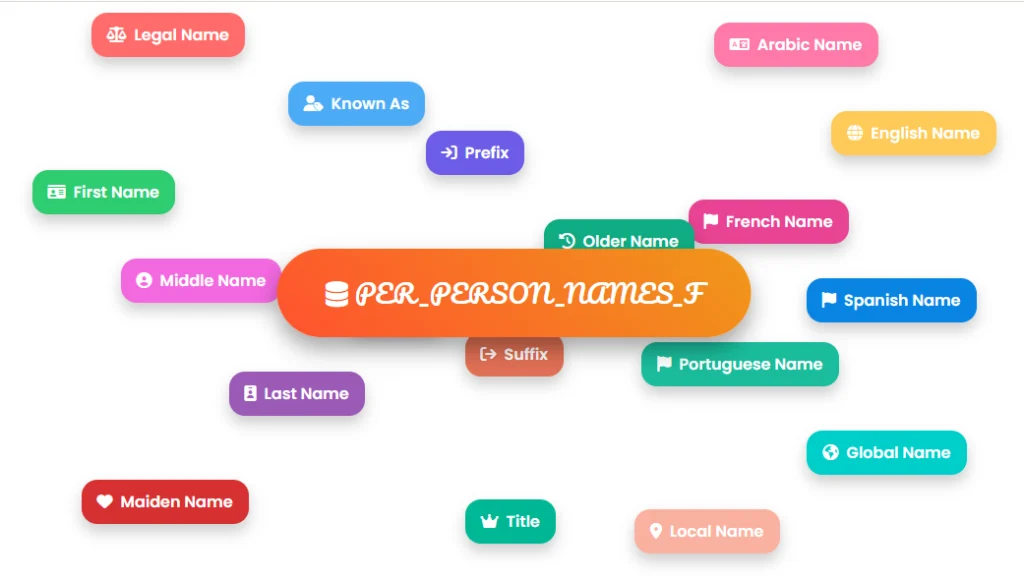
The following visual representation illustrates how different name types and variations are structured and related within the PER_PERSON_NAMES_F table in Oracle Fusion HCM.
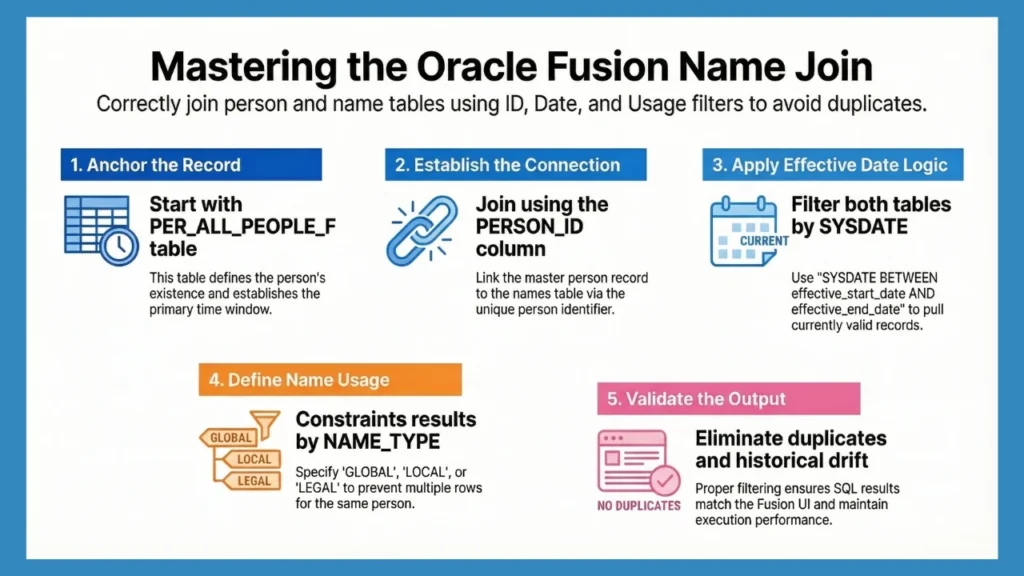
This separation, however, introduces practical challenges for developers. Queries that appear correct often return duplicate names, unexpected historical records, or results that do not match what users see in the HCM UI. These issues are not data problems; they are usually the result of incomplete joins or missing effective-date logic.
This article focuses on how to join PER_PERSON_NAMES_F with PER_ALL_PEOPLE_F correctly, using patterns that are performant, predictable, and safe for production reporting and integrations.
Understanding PER_PERSON_NAMES_F
PER_PERSON_NAMES_F exists because names in Oracle Fusion HCM are not treated as static attributes of a person. A single individual may have multiple valid names simultaneously, as well as historical names that must remain available for reporting, payroll, and audit purposes.
Fusion models this by storing names as effective-dated records, separated from the core person entity.
Each row in PER_PERSON_NAMES_F represents one version of a person’s name, defined by its usage and the period for which it is valid.
Name usages such as Global, Local, Legal, and Preferred can coexist, and changes to a person’s name are captured by ending the existing record and creating a new one rather than overwriting data. This approach ensures historical accuracy while allowing Fusion to consistently determine which name applies in each context.
As a result, multiple rows for the same PERSON_ID are normal in production environments and should be expected in any non-trivial query.
| Column Name | Description |
|---|---|
| PERSON_ID | Links the name record to the person master |
| NAME_TYPE | Indicates how the name is intended to be used |
| EFFECTIVE_START_DATE | Date from which the name is valid |
| EFFECTIVE_END_DATE | Date until which the name is valid |
| DISPLAY_NAME | Formatted name used in Fusion UI and documents |
Must Read: PER_ALL_PEOPLE_F – All You Need to Know
Understanding PER_ALL_PEOPLE_F
In Oracle Fusion HCM, PER_ALL_PEOPLE_F is the table everything else eventually anchors to. When person-related queries behave unexpectedly, this table is almost always part of the reason. It defines the existence of a person in the system and establishes the time window in which any related data is considered valid.
The table is effective-dated and reflects changes to a person’s lifecycle rather than their attributes. Hires, terminations, rehires, and future-dated changes are all expressed through date ranges rather than row replacements.
Because of this, a person can legitimately exist in multiple time slices, even though only one slice is relevant for a given query.
This is also why joins that start anywhere other than PER_ALL_PEOPLE_F tend to drift. Name records, assignments, and other dependent data can appear valid in isolation, but without the person record defining the same effective period, the result does not represent a consistent Fusion snapshot.
| Column Name | Description |
|---|---|
| PERSON_ID | Identifier used across person-related tables |
| PERSON_NUMBER | Stable business identifier |
| PERSON_TYPE_ID | Person classification |
| EFFECTIVE_START_DATE | Start of person validity |
| EFFECTIVE_END_DATE | End of person validity |
The Relationship Between the PER_ALL_PEOPLE_F and PER_PERSON_NAMES_F
The relationship between PER_ALL_PEOPLE_F and PER_PERSON_NAMES_F is simple on paper and messy in real data. One person can have several name records at the same time, and many more spread across their history. This is normal behavior in Fusion and becomes obvious as soon as you query a mature environment.
At a data level, the relationship is one-to-many. A single person record can be associated with multiple name records, differentiated by name usage and by the period for which each name is valid. The tables are linked through PERSON_ID, but that join alone does not define which name applies.
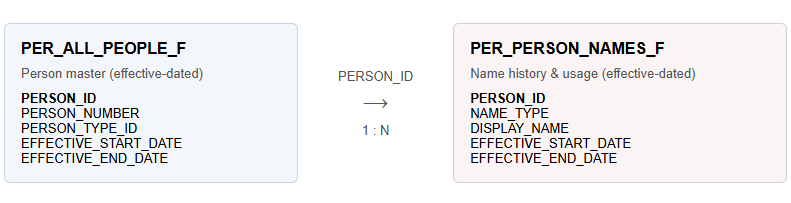
Basic Join Between PER_PERSON_NAMES_F and PER_ALL_PEOPLE_F
At some point, person data and name data must be brought together. In Fusion environments, this usually starts with a simple join that most developers will already recognize. The structure itself is familiar; the behavior it produces depends entirely on how time is handled.
A commonly used baseline query looks like this:
| SELECT papf.person_number, ppnf.full_name FROM per_all_people_f papf, per_person_names_f ppnf WHERE papf.person_id = ppnf.person_id AND SYSDATE BETWEEN papf.effective_start_date AND papf.effective_end_date AND SYSDATE BETWEEN ppnf.effective_start_date AND ppnf.effective_end_date ; |
This pattern evaluates both the person and the name within the same date context and ties them together using PERSON_ID. It avoids combining a valid person record with a name that belongs to a different point in time, which is one of the more subtle ways incorrect results appear in Fusion queries.
Even with this alignment in place, the result set can still return more than one row per person. That outcome is expected and reflects how Fusion models name data rather than an issue with the join itself.
At this stage, the join is behaving correctly. Any further narrowing of results comes from being explicit about which name is required, not from changing the join structure.
Filtering by NAME_TYPE (Best Practice)
In Fusion environments, multiple name records are often valid for the same person at the same point in time. This is not an edge case and does not indicate inconsistent data. It reflects how Fusion separates name usage rather than assuming a single canonical name.
NAME_TYPE is the mechanism used to distinguish these records. It defines how a name is intended to be used, not whether it is current or historical. In most production systems, Global and Local names coexist, and Preferred names are frequently present as well.
Common NAME_TYPE values include:
- GLOBAL
- LOCAL
- LEGAL
Without a NAME_TYPE constraint, the query is effectively asking for all valid name representations of a person. Applying a filter simply narrows the result to a specific usage:
| AND ppnf.name_type = ‘GLOBAL’ |
Which value is appropriate depends on the business context, but the presence of multiple rows without this filter is expected behavior. Fusion is returning exactly what is stored, without making assumptions on the caller’s behalf.
Handling Effective Dating Correctly
Effective dating in Fusion usually becomes visible only when something changes. As long as a name stays the same, the table looks simple. The moment a legal update happens, the data starts to show why names are treated as time-bound records rather than static attributes.
Let’s consider a common scenario.
An employee joins the organization with the legal name Annie Smith. That name remains valid until a legal name change takes effect on 1 July 2025, when the employee updates her surname to Annie Jones.
In PER_PERSON_NAMES_F, this does not result in an update to the existing row. Instead, the data evolves as follows:

This pattern is not limited to legal name changes. It appears in corrections, retroactive updates, and future-dated changes as well. Over time, name history accumulates naturally, and multiple records for the same PERSON_ID become the norm rather than the exception.
When name data is viewed without a date context, these rows appear together and can look like duplicates. In reality, they represent different points along the same timeline. Fusion is storing exactly what happened, when it happened, and for how long it was valid.
Common Issues & Troubleshooting
When PER_PERSON_NAMES_F is queried alongside person data, the results are usually correct from the database’s point of view, even when they look unexpected to the developer. What tends to surface as an “issue” is often just Fusion returning multiple valid interpretations of the same person, based on usage or time.
The patterns below are commonly observed in production environments.
| Outcome | What the data reflects | Why it appears this way |
|---|---|---|
| Duplicate rows | Multiple active name records | More than one NAME_TYPE is valid for the same person and date |
| Missing names | Name exists outside the evaluated period | Person and name records do not overlap on the same effective date |
| Older names appearing | Historical name rows included | Name history is preserved and returned when no date context is applied |
| Inconsistent UI vs SQL output | Different name usage selected | Fusion UI applies context-specific NAME_TYPE logic |
| Large result sets | Full name history scanned | Effective-date or usage constraints are absent |
None of these outcomes indicates corrupted or inconsistent data. They are a consequence of how Fusion models person identity across time and usage. PER_PERSON_NAMES_F does not attempt to infer intent; it returns what is valid according to the conditions supplied.
In practice, these scenarios tend to surface during ad-hoc exploration or early reporting drafts, where the query is structurally correct but underspecified. As more context is added, the result set usually stabilizes without requiring any changes to the underlying data.
Also Read: Oracle Fusion Joins Explained
Performance Tips for Fusion HCM SQL
Queries that involve PER_PERSON_NAMES_F tend to behave well initially and then change character as environments mature. Name history accumulates quietly over time, and queries that once returned small, predictable result sets begin to touch a much larger portion of the table.
The SQL itself may remain unchanged, but the amount of data being evaluated increases steadily.
What usually differentiates stable queries from those that degrade is not complexity, but how early the query establishes time and usage context. Queries that narrow the eligible data set at the person and name level tend to remain consistent as history grows.
Queries that defer this context allow historical rows to remain in scope longer than intended, which increases execution cost even when the final output looks correct.
The patterns below reflect how these differences typically surface in long-running Fusion environments.
| Query characteristic | Typical behavior over time |
|---|---|
| Effective dates evaluated on both tables | Execution plans remain stable as name history grows |
| NAME_TYPE explicitly constrained | Row counts stay predictable across reporting cycles |
| PERSON_ID used as primary join key | Index access paths remain efficient |
| Date or usage context omitted | Historical rows accumulate silently in execution |
| Late filtering of name data | Increased I/O despite unchanged results |
In practice, performance issues around person names rarely appear as sudden failures. They emerge gradually as more history is introduced, making them easy to overlook until the same query is run in a larger or older environment. The difference is usually visible in execution behavior long before it becomes obvious in the output.
Using CloudSQL to Simplify HCM Joins (Product Tie-In)
Working with PER_PERSON_NAMES_F usually involves iteration. A query is written, the results are inspected, filters are adjusted, and the process is repeated, especially when effective dates and name types are involved. CloudSQL supports this workflow by making exploration and validation faster, not by abstracting Oracle Fusion behavior.
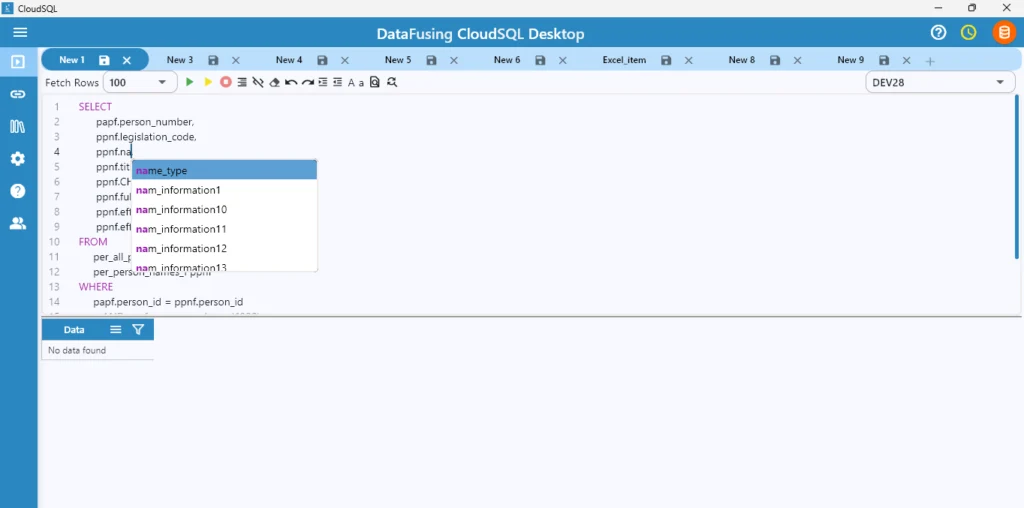
Auto Suggestions
When writing queries, CloudSQL provides auto suggestions for tables and columns. This reduces context switching to documentation and helps avoid simple mistakes such as incorrect column names or missing fields when working with large Fusion schemas.
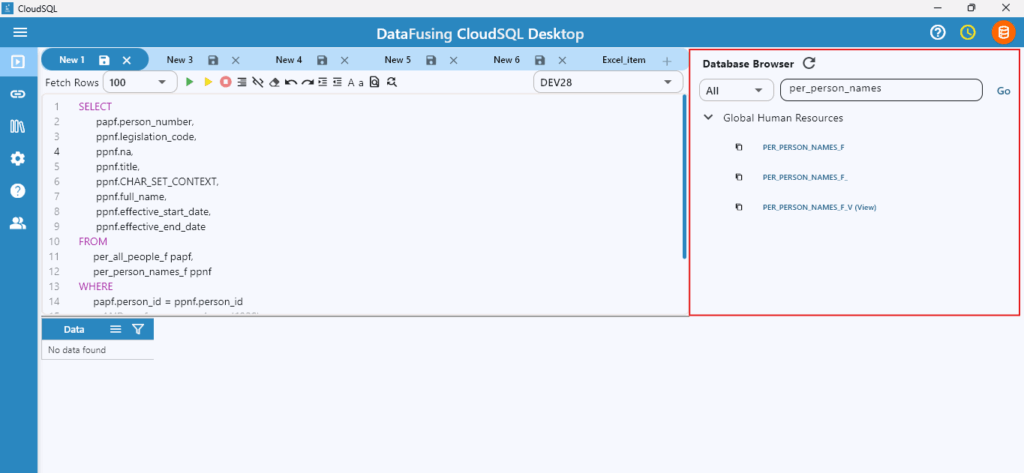
Database Browser
The database browser makes it easier to locate PER_PERSON_NAMES_F, related tables such as PER_ALL_PEOPLE_F, and understand their structure quickly. This is particularly useful when navigating across Core HR, Payroll, Benefits, Absence, or Projects data without needing to memorize table names.
Dynamic Result Grid
Most issues with name data are discovered after the query runs. CloudSQL’s dynamic result grid allows developers to:
- Filter results inline
- Sort by effective dates or name types
- Group records to spot duplicates
- Search within results
- Jump directly to specific columns
- Inspect a single record in isolation
This makes it easier to validate whether:
- Multiple name records exist for the same person
- Effective dates overlap or appear incorrect
- The expected NAME_TYPE is being returned
How to Join Other Tables?
Joins involving PER_PERSON_NAMES_F rarely stand alone. In most Fusion queries, name data is combined with other person-related tables to provide operational or system context. The table below reflects where name data most commonly intersects with other domains.
| Table joined | What it adds | Why it’s usually pulled in |
|---|---|---|
| PER_ALL_PEOPLE_F | Person identity and lifecycle | Establishes the person context for the name |
| PER_ALL_ASSIGNMENTS_F | Job, department, legal entity | Adds organisational meaning |
| PER_USERS | Application user mapping | Links Fusion users to people |
| PER_PERSON_TYPES | Workforce classification | Distinguishes employees from contingent workers |
| PER_PEOPLE_LEGISLATIVE_F | Person legislative information like marital status, sex | Adds legislative and statutory context to the person |

Below is a simplified representation of how these tables typically relate to each other.

Conclusion
PER_PERSON_NAMES_F sits at the intersection of identity, history, and usage in Oracle Fusion HCM. Its behavior is consistent, but it only becomes predictable once queries respect how Fusion models time and name purpose rather than assuming a single, static representation of a person.
Most issues developers encounter with name data are not caused by incorrect joins or bad data. They surface when historical records, multiple name usages, or misaligned date contexts are interpreted without the broader person framework provided by PER_ALL_PEOPLE_F. Once that framework is in place, name data behaves as expected across reporting, payroll, and integrations.
Understanding how PER_PERSON_NAMES_F relates to other person-related tables makes it easier to reason about query results as environments mature and history accumulates. Tools like CloudSQL help bridge the gap between querying data and understanding its meaning, but the underlying patterns remain the same.
When these patterns are recognized, working with person names in Fusion becomes less about trial and error and more about reading the data model as it was designed.
Suggested Read: Top 10 Oracle Fusion SQL Mistakes Developers Make
FAQs (Frequently Asked Questions)
How do I join PER_PERSON_NAMES_F in Oracle Fusion?
PER_PERSON_NAMES_F is joined to person data using PERSON_ID, with PER_ALL_PEOPLE_F acting as the anchor. Both tables are effective-dated, so the join only represents a valid snapshot when they are evaluated for the same date context. In most cases, additional filtering is required to narrow the result to the intended name usage.
Why does PER_PERSON_NAMES_F return multiple rows?
Multiple rows are expected. Oracle Fusion allows more than one name record to be valid for the same person, either because different name usages coexist (such as Global and Local) or because historical name changes are preserved over time. Without restricting usage or date context, Fusion returns all name records that are valid according to the query conditions.
What is NAME_TYPE in PER_PERSON_NAMES_F?
NAME_TYPE defines how a name record is intended to be used within Fusion rather than when it was created. It distinguishes between different representations of a person’s name, such as Global, Local, Legal, or Preferred. Fusion relies on NAME_TYPE, along with effective dates and context, to determine which name applies in a given scenario.